# Advertências

<span style="font-family: 'Segoe UI', sans-serif; color: rgb(52, 73, 94); background: white;">Use esta funcionalidade para criar e gerenciar advertências, que são comunicações formais de empregadores a funcionários, destacando problemas de desempenho, conduta ou conformidade com políticas da empresa.</span>

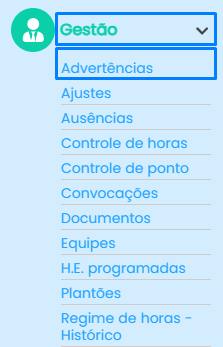
<span style="color: rgb(52, 73, 94);"><span style="font-family: 'Segoe UI', sans-serif; background: white;">Para acessar as advertências, clique em **gestão &gt;&gt; advertências**, no canto esquerdo da sua tela.  
</span></span>[![image.png](https://iopedia.iopoint.com.br/uploads/images/gallery/2025-03/scaled-1680-/lefUKNVqNI8FQDcX-image.png)](https://iopedia.iopoint.com.br/uploads/images/gallery/2025-03/lefUKNVqNI8FQDcX-image.png)

<span style="font-family: 'Segoe UI', sans-serif; color: rgb(52, 73, 94); background: white;"> <span style="font-size: 11.0pt; line-height: 107%; font-family: 'Calibri',sans-serif; mso-ascii-theme-font: minor-latin; mso-fareast-font-family: Calibri; mso-fareast-theme-font: minor-latin; mso-hansi-theme-font: minor-latin; mso-bidi-font-family: 'Times New Roman'; mso-bidi-theme-font: minor-bidi; mso-ansi-language: PT-BR; mso-fareast-language: EN-US; mso-bidi-language: AR-SA;">Após clicar em advertências, encontrará a seguinte tela:  
[![tela inicial advertencias.png](https://iopedia.iopoint.com.br/uploads/images/gallery/2025-03/scaled-1680-/i7J8aRKbOxTOa4Fy-tela-inicial-advertencias.png)](https://iopedia.iopoint.com.br/uploads/images/gallery/2025-03/i7J8aRKbOxTOa4Fy-tela-inicial-advertencias.png)  
</span></span>

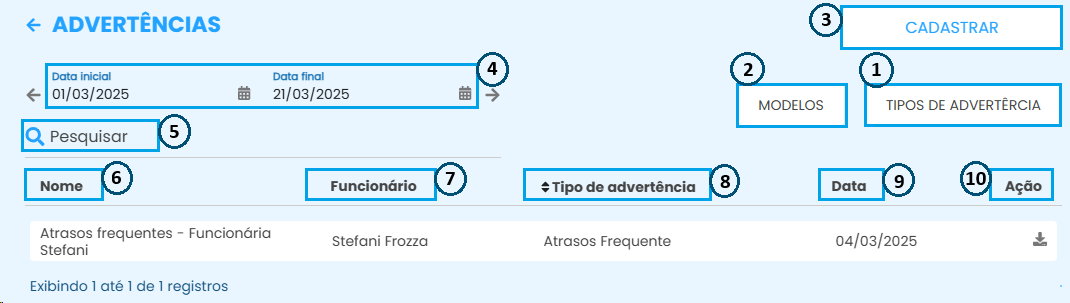
1. <span style="color: rgb(52, 73, 94);"><span style="font-family: 'Segoe UI', sans-serif; background: white;"><span style="font-size: 11.0pt; line-height: 107%; font-family: 'Calibri',sans-serif; mso-ascii-theme-font: minor-latin; mso-fareast-font-family: Calibri; mso-fareast-theme-font: minor-latin; mso-hansi-theme-font: minor-latin; mso-bidi-font-family: 'Times New Roman'; mso-bidi-theme-font: minor-bidi; mso-ansi-language: PT-BR; mso-fareast-language: EN-US; mso-bidi-language: AR-SA;"> Utilize esse menu para definir os **tipos de advertências** que são aplicados em sua empresa.   
    [![CADASTRO DE TIPOS DE ADVERTENCIA.png](https://iopedia.iopoint.com.br/uploads/images/gallery/2025-03/scaled-1680-/NRvLwPmNiV0KTNJw-cadastro-de-tipos-de-advertencia.png)](https://iopedia.iopoint.com.br/uploads/images/gallery/2025-03/NRvLwPmNiV0KTNJw-cadastro-de-tipos-de-advertencia.png)  

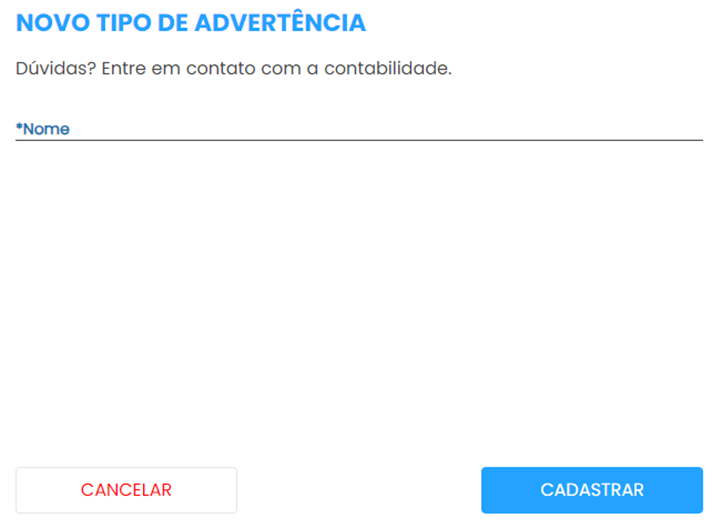
    1.A Clique em **cadastrar** para incluir um novo tipo de advertência; <span style="mso-spacerun: yes;"> </span>  
    </span></span>[![image.png](https://iopedia.iopoint.com.br/uploads/images/gallery/2024-05/scaled-1680-/8TJimage.png)](https://iopedia.iopoint.com.br/uploads/images/gallery/2024-05/8TJimage.png)  
      
    <span style="font-family: 'Segoe UI', sans-serif; background: white;"><span style="font-size: 11.0pt; line-height: 107%; font-family: 'Calibri',sans-serif; mso-ascii-theme-font: minor-latin; mso-fareast-font-family: Calibri; mso-fareast-theme-font: minor-latin; mso-hansi-theme-font: minor-latin; mso-bidi-font-family: 'Times New Roman'; mso-bidi-theme-font: minor-bidi; mso-ansi-language: PT-BR; mso-fareast-language: EN-US; mso-bidi-language: AR-SA;">1.B **Pesquise** por um tipo especifico já cadastrado;   
    1.C **Nome** dos tipos de advertências;  
    1.D <span style="font-family: 'Segoe UI', sans-serif; background: white;"><span style="font-size: 11.0pt; line-height: 107%; font-family: 'Calibri',sans-serif; mso-ascii-theme-font: minor-latin; mso-fareast-font-family: Calibri; mso-fareast-theme-font: minor-latin; mso-hansi-theme-font: minor-latin; mso-bidi-font-family: 'Times New Roman'; mso-bidi-theme-font: minor-bidi; mso-ansi-language: PT-BR; mso-fareast-language: EN-US; mso-bidi-language: AR-SA;">Informação onde condiz se o tipo está **ativo** ou **inativo**, e tendo a possibilidade de filtrar por **todos**;   
    </span></span></span></span><span style="font-family: 'Segoe UI', sans-serif; background: white;">1.E </span></span>Utilize os ícones abaixo de "Ação" para realizar ações individuais para cada cadastro.  
    **Primeiro ícone de ação [![image.png](https://iopedia.iopoint.com.br/uploads/images/gallery/2024-05/scaled-1680-/unjimage.png)](https://iopedia.iopoint.com.br/uploads/images/gallery/2024-05/unjimage.png):** Edição no tipo de advertência;   
    **Segundo** **ícone de ação** ![](https://lh7-us.googleusercontent.com/rg9YdaYGdOEWB45Q5P3cflp5LBkCZaX-MTYphhFGZKHppo_KH_dF54pf6V8iQKgoiHoe4aZNMs4WVBBpIrNwwgtgfudq7p0NLYCT-StBVhng6QcDqTbV30w4mnethpAdwAUTy84OoLI2hx7yQUzcKQ): Exclusões de cadastros<span style="color: rgb(52, 73, 94);"><span style="font-family: 'Segoe UI', sans-serif; background: white;">  
    <span style="font-size: 10.5pt; line-height: 107%; font-family: 'Segoe UI', sans-serif; background: white;"> </span>  
    </span></span>
2. <span style="color: rgb(52, 73, 94);"><span style="font-family: 'Segoe UI', sans-serif; background: white;"><span style="font-size: 10.5pt; line-height: 107%; font-family: 'Segoe UI', sans-serif; background: white;"><span style="mso-spacerun: yes;"> </span>Em "**modelos**", personalize documentos com informações específicas para cada tipo de advertência aplicada.  
    [![Modelos de advertencias.png](https://iopedia.iopoint.com.br/uploads/images/gallery/2025-03/scaled-1680-/MO88jWUSmUDOX2Eg-modelos-de-advertencias.png)](https://iopedia.iopoint.com.br/uploads/images/gallery/2025-03/MO88jWUSmUDOX2Eg-modelos-de-advertencias.png)  

      
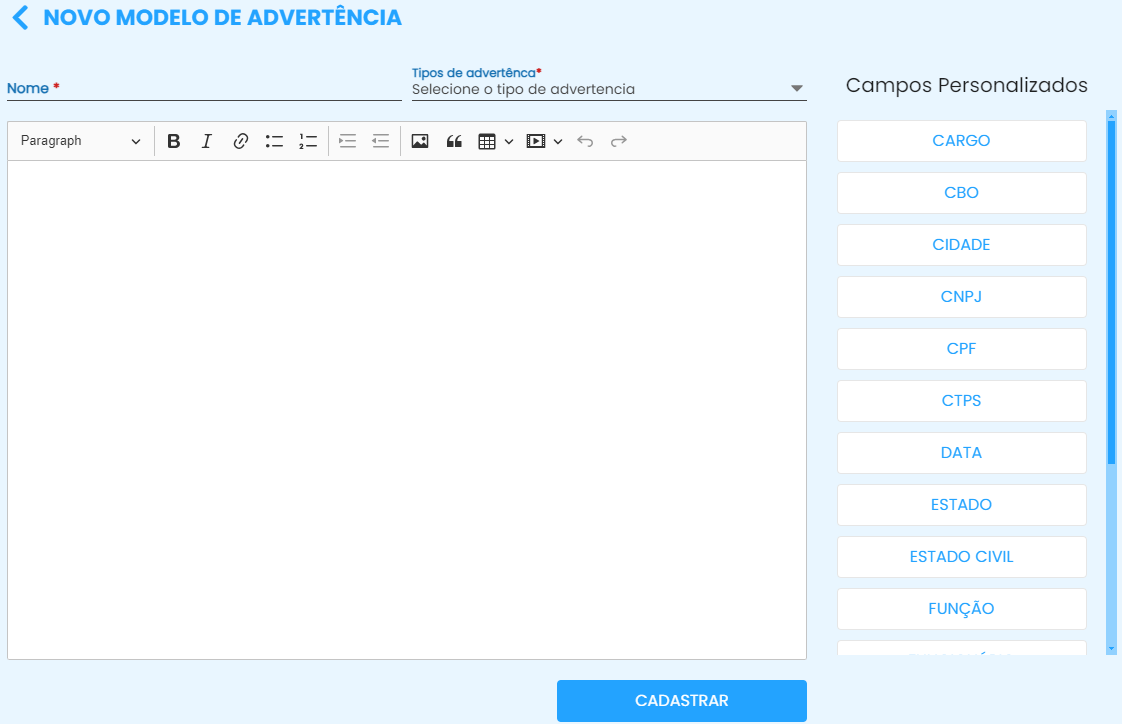
    <span style="font-size: 10.5pt; line-height: 107%; font-family: 'Segoe UI', sans-serif; background: white;">2.A Clique em **cadastrar** para **personalizar um documento**;<span style="mso-spacerun: yes;"> </span></span>  
    </span></span>[![image.png](https://iopedia.iopoint.com.br/uploads/images/gallery/2024-05/scaled-1680-/JzDimage.png)](https://iopedia.iopoint.com.br/uploads/images/gallery/2024-05/JzDimage.png)</span>  
    <span style="color: rgb(52, 73, 94);">**<span style="font-family: 'Calibri', sans-serif; background: white;">Nome:</span>**<span style="background: white;"> Defina um nome para o modelo de advertência;  
    **<span style="font-family: 'Calibri',sans-serif; mso-ascii-theme-font: minor-latin; mso-hansi-theme-font: minor-latin; mso-bidi-theme-font: minor-latin; mso-bidi-font-weight: normal;">Tipos de advertência</span>**: Selecione o tipo de advertência conforme os cadastros realizados no tópico 1;  
    **<span style="font-family: 'Calibri',sans-serif; mso-ascii-theme-font: minor-latin; mso-hansi-theme-font: minor-latin; mso-bidi-theme-font: minor-latin; mso-bidi-font-weight: normal;">Campos Personalizados:</span>** Ao selecionar os menus da lista, os dados do funcionário serão exibidos ao selecioná-lo;  
    Insira todas as informações desejadas no arquivo e finalize clicando em **<span style="font-family: 'Calibri',sans-serif; mso-ascii-theme-font: minor-latin; mso-hansi-theme-font: minor-latin; mso-bidi-theme-font: minor-latin; mso-bidi-font-weight: normal;">cadastrar. </span>**</span></span>
    
    <span style="font-family: 'Segoe UI', sans-serif; color: rgb(52, 73, 94); background: white;"><span style="font-size: 10.5pt; line-height: 107%; font-family: 'Segoe UI', sans-serif; background: white;"><span style="font-size: 10.5pt; line-height: 107%; font-family: 'Segoe UI', sans-serif; background: white;">  
    </span></span></span><span style="color: rgb(52, 73, 94);"><span style="background: white;"> 2.B **<span style="font-family: 'Calibri',sans-serif; mso-ascii-theme-font: minor-latin; mso-hansi-theme-font: minor-latin; mso-bidi-theme-font: minor-latin;">Pesquise</span>** por um modelo de arquivo cadastrado;  
    2.C **<span style="font-family: 'Calibri',sans-serif; mso-ascii-theme-font: minor-latin; mso-hansi-theme-font: minor-latin; mso-bidi-theme-font: minor-latin;">Nome </span>**dos modelos;   
    2.D **<span style="font-family: 'Calibri',sans-serif; mso-ascii-theme-font: minor-latin; mso-hansi-theme-font: minor-latin; mso-bidi-theme-font: minor-latin;">Tipo de advertência</span>** selecionado para indicar a que se refere o arquivo;   
    2.E Utilize os ícones abaixo de "Ação" para realizar ações individuais para cada cadastro.  
    **Primeiro ícone de ação [![embedded-image-1nDzeHCy.png](https://iopedia.iopoint.com.br/uploads/images/gallery/2024-09/scaled-1680-/tB6Ld8jDMqSQ3ybW-embedded-image-1ndzehcy.png)](https://iopedia.iopoint.com.br/uploads/images/gallery/2024-09/tB6Ld8jDMqSQ3ybW-embedded-image-1ndzehcy.png)** : Edição de modelos de advertência;  
    **Segundo ícone de ação [![embedded-image-mm1Y1JFP.png](https://iopedia.iopoint.com.br/uploads/images/gallery/2024-09/scaled-1680-/ZBXSjwxnX3rqKIoa-embedded-image-mm1y1jfp.png)](https://iopedia.iopoint.com.br/uploads/images/gallery/2024-09/ZBXSjwxnX3rqKIoa-embedded-image-mm1y1jfp.png)** : Exclusões de cadastros</span></span>
    
    <span style="font-family: 'Segoe UI', sans-serif; color: rgb(52, 73, 94); background: white;"><span style="font-size: 10.5pt; line-height: 107%; font-family: 'Segoe UI', sans-serif; background: white;"><span style="font-size: 10.5pt; line-height: 107%; font-family: 'Segoe UI', sans-serif; background: white;"><span style="font-family: 'Segoe UI', sans-serif; background: white;">  
    </span></span></span></span>
3. <span style="font-family: 'Segoe UI', sans-serif; color: rgb(52, 73, 94); background: white;"><span style="font-size: 10.5pt; line-height: 107%; font-family: 'Segoe UI', sans-serif; background: white;"><span style="font-size: 10.5pt; line-height: 107%; font-family: 'Segoe UI', sans-serif; background: white;"><span style="font-family: 'Segoe UI', sans-serif; background: white;"><span style="font-size: 11.0pt; line-height: 107%; font-family: 'Calibri',sans-serif; mso-ascii-theme-font: minor-latin; mso-fareast-font-family: Calibri; mso-fareast-theme-font: minor-latin; mso-hansi-theme-font: minor-latin; mso-bidi-font-family: 'Times New Roman'; mso-bidi-theme-font: minor-bidi; mso-ansi-language: PT-BR; mso-fareast-language: EN-US; mso-bidi-language: AR-SA;">Clique em **cadastrar** para registrar uma advertência para os funcionários.  
    [![CADASTRO DE ADVERTENCIAS.png](https://iopedia.iopoint.com.br/uploads/images/gallery/2025-03/scaled-1680-/UtRyXx1AOhBOcbWC-cadastro-de-advertencias.png)](https://iopedia.iopoint.com.br/uploads/images/gallery/2025-03/UtRyXx1AOhBOcbWC-cadastro-de-advertencias.png)  
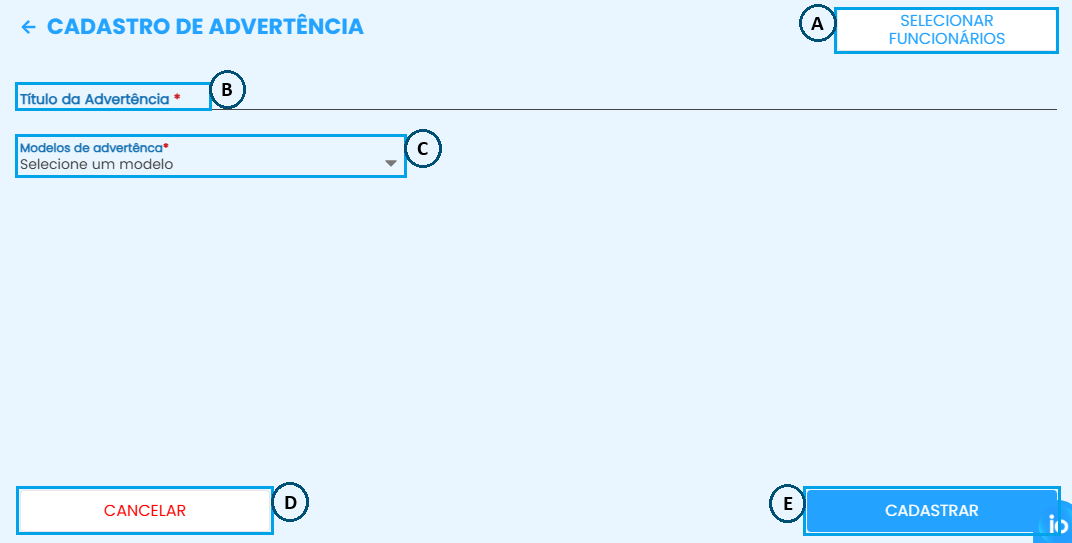
    3.A Selecione os funcionários que vão ser vinculados à advertencia  
    3.B Defina um **nome** para o novo tipo de advertência (a mesma constará na tela principal da funcionalidade);   
    3.C **Selecione um modelo** de advertência já cadastrado;  
    3.D Clique em **"Cancelar"** para desfazer a ação e fechar a tela de cadastro.  
    3.E Clique em **"Cadastrar"** para finalizar o cadastro de advertência.   
      
    </span></span></span></span></span>
4. <span style="font-family: 'Segoe UI', sans-serif; color: rgb(52, 73, 94); background: white;"><span style="font-size: 10.5pt; line-height: 107%; font-family: 'Segoe UI', sans-serif; background: white;"><span style="font-size: 10.5pt; line-height: 107%; font-family: 'Segoe UI', sans-serif; background: white;"><span style="font-family: 'Segoe UI', sans-serif; background: white;"><span style="font-size: 11.0pt; line-height: 107%; font-family: 'Calibri',sans-serif; mso-ascii-theme-font: minor-latin; mso-fareast-font-family: Calibri; mso-fareast-theme-font: minor-latin; mso-hansi-theme-font: minor-latin; mso-bidi-font-family: 'Times New Roman'; mso-bidi-theme-font: minor-bidi; mso-ansi-language: PT-BR; mso-fareast-language: EN-US; mso-bidi-language: AR-SA;"><span style="mso-spacerun: yes;"> </span>Escolha um intervalo de tempo para ver os cadastros feitos durante esse **período**.  
      
    </span></span></span></span></span>
5. <span style="font-family: 'Segoe UI', sans-serif; color: rgb(52, 73, 94); background: white;"><span style="font-size: 10.5pt; line-height: 107%; font-family: 'Segoe UI', sans-serif; background: white;"><span style="font-size: 10.5pt; line-height: 107%; font-family: 'Segoe UI', sans-serif; background: white;"><span style="font-family: 'Segoe UI', sans-serif; background: white;"><span style="font-size: 11.0pt; line-height: 107%; font-family: 'Calibri',sans-serif; mso-ascii-theme-font: minor-latin; mso-fareast-font-family: Calibri; mso-fareast-theme-font: minor-latin; mso-hansi-theme-font: minor-latin; mso-bidi-font-family: 'Times New Roman'; mso-bidi-theme-font: minor-bidi; mso-ansi-language: PT-BR; mso-fareast-language: EN-US; mso-bidi-language: AR-SA;"><span style="font-size: 11pt; line-height: 107%; font-family: Calibri, sans-serif; background: white;">Utilize o campo de </span>**<span style="font-family: 'Calibri',sans-serif; mso-ascii-theme-font: minor-latin; mso-hansi-theme-font: minor-latin; mso-bidi-theme-font: minor-latin; border: none windowtext 1.0pt; mso-border-alt: none windowtext 0cm; padding: 0cm;">pesquisa</span>**<span style="font-variant-ligatures: normal; font-variant-caps: normal; orphans: 2; text-align: start; widows: 2; -webkit-text-stroke-width: 0px; float: none; word-spacing: 0px;"> para procurar por uma advertência cadastrada.  
      
    </span></span></span></span></span></span>
6. <span style="font-family: 'Segoe UI', sans-serif; color: rgb(52, 73, 94); background: white;"><span style="font-size: 10.5pt; line-height: 107%; font-family: 'Segoe UI', sans-serif; background: white;"><span style="font-size: 10.5pt; line-height: 107%; font-family: 'Segoe UI', sans-serif; background: white;"><span style="font-family: 'Segoe UI', sans-serif; background: white;"><span style="font-size: 11.0pt; line-height: 107%; font-family: 'Calibri',sans-serif; mso-ascii-theme-font: minor-latin; mso-fareast-font-family: Calibri; mso-fareast-theme-font: minor-latin; mso-hansi-theme-font: minor-latin; mso-bidi-font-family: 'Times New Roman'; mso-bidi-theme-font: minor-bidi; mso-ansi-language: PT-BR; mso-fareast-language: EN-US; mso-bidi-language: AR-SA;"><span style="font-variant-ligatures: normal; font-variant-caps: normal; orphans: 2; text-align: start; widows: 2; -webkit-text-stroke-width: 0px; float: none; word-spacing: 0px;"><span style="font-size: 11pt; line-height: 107%; font-family: Calibri, sans-serif; background: white;">**Nome**/descrição das advertências registradas.  
      
    </span></span></span></span></span></span></span>
7. <span style="font-family: 'Segoe UI', sans-serif; color: rgb(52, 73, 94); background: white;"><span style="font-size: 10.5pt; line-height: 107%; font-family: 'Segoe UI', sans-serif; background: white;"><span style="font-size: 10.5pt; line-height: 107%; font-family: 'Segoe UI', sans-serif; background: white;"><span style="font-family: 'Segoe UI', sans-serif; background: white;"><span style="font-size: 11.0pt; line-height: 107%; font-family: 'Calibri',sans-serif; mso-ascii-theme-font: minor-latin; mso-fareast-font-family: Calibri; mso-fareast-theme-font: minor-latin; mso-hansi-theme-font: minor-latin; mso-bidi-font-family: 'Times New Roman'; mso-bidi-theme-font: minor-bidi; mso-ansi-language: PT-BR; mso-fareast-language: EN-US; mso-bidi-language: AR-SA;"><span style="font-variant-ligatures: normal; font-variant-caps: normal; orphans: 2; text-align: start; widows: 2; -webkit-text-stroke-width: 0px; float: none; word-spacing: 0px;"><span style="font-size: 11pt; line-height: 107%; font-family: Calibri, sans-serif; background: white;"><span style="font-size: 11pt; line-height: 107%; font-family: Calibri, sans-serif; background: white;">Nome do **funcionário vinculado**.  
      
    </span></span></span></span></span></span></span></span>
8. <span style="font-family: 'Segoe UI', sans-serif; color: rgb(52, 73, 94); background: white;"><span style="font-size: 10.5pt; line-height: 107%; font-family: 'Segoe UI', sans-serif; background: white;"><span style="font-size: 10.5pt; line-height: 107%; font-family: 'Segoe UI', sans-serif; background: white;"><span style="font-family: 'Segoe UI', sans-serif; background: white;"><span style="font-size: 11.0pt; line-height: 107%; font-family: 'Calibri',sans-serif; mso-ascii-theme-font: minor-latin; mso-fareast-font-family: Calibri; mso-fareast-theme-font: minor-latin; mso-hansi-theme-font: minor-latin; mso-bidi-font-family: 'Times New Roman'; mso-bidi-theme-font: minor-bidi; mso-ansi-language: PT-BR; mso-fareast-language: EN-US; mso-bidi-language: AR-SA;"><span style="font-variant-ligatures: normal; font-variant-caps: normal; orphans: 2; text-align: start; widows: 2; -webkit-text-stroke-width: 0px; float: none; word-spacing: 0px;"><span style="font-size: 11pt; line-height: 107%; font-family: Calibri, sans-serif; background: white;"><span style="font-size: 11pt; line-height: 107%; font-family: Calibri, sans-serif; background: white;"><span style="font-size: 11pt; line-height: 107%; font-family: Calibri, sans-serif; background: white;">**Tipo de advertência** selecionado no modelo cadastrado.  
      
    </span></span></span></span></span></span></span></span></span>
9. <span style="font-family: 'Segoe UI', sans-serif; color: rgb(52, 73, 94); background: white;"><span style="font-size: 10.5pt; line-height: 107%; font-family: 'Segoe UI', sans-serif; background: white;"><span style="font-size: 10.5pt; line-height: 107%; font-family: 'Segoe UI', sans-serif; background: white;"><span style="font-family: 'Segoe UI', sans-serif; background: white;"><span style="font-size: 11.0pt; line-height: 107%; font-family: 'Calibri',sans-serif; mso-ascii-theme-font: minor-latin; mso-fareast-font-family: Calibri; mso-fareast-theme-font: minor-latin; mso-hansi-theme-font: minor-latin; mso-bidi-font-family: 'Times New Roman'; mso-bidi-theme-font: minor-bidi; mso-ansi-language: PT-BR; mso-fareast-language: EN-US; mso-bidi-language: AR-SA;"><span style="font-variant-ligatures: normal; font-variant-caps: normal; orphans: 2; text-align: start; widows: 2; -webkit-text-stroke-width: 0px; float: none; word-spacing: 0px;"><span style="font-size: 11pt; line-height: 107%; font-family: Calibri, sans-serif; background: white;"><span style="font-size: 11pt; line-height: 107%; font-family: Calibri, sans-serif; background: white;"><span style="font-size: 11pt; line-height: 107%; font-family: Calibri, sans-serif; background: white;"><span style="font-size: 11pt; line-height: 107%; font-family: Calibri, sans-serif; background: white;">**Data** de cadastro.  
      
    </span></span></span></span></span></span></span></span></span></span>
10. <span style="color: rgb(52, 73, 94);"><span style="mso-list: Ignore;"><span style="font: 7.0pt 'Times New Roman';"> </span></span><span style="background: white;">Clique no ícone [![image.png](https://iopedia.iopoint.com.br/uploads/images/gallery/2025-03/scaled-1680-/0k3getffmplrMJSs-image.png)](https://iopedia.iopoint.com.br/uploads/images/gallery/2025-03/0k3getffmplrMJSs-image.png) </span></span><span style="color: rgb(52, 73, 94);"><span style="background: white;">para **baixar** o arquivo em </span><span style="background: white;"><span style="background-color: rgb(255, 255, 255);">PDF</span>.</span></span>

<span style="color: rgb(52, 73, 94);"><span style="background: white;">Ficou alguma dúvida? Entre em contato com nosso suporte através do WhatsApp (49) 3191-0333. </span></span>